


GOING VIRAL | LIMITED OFFER
Digital Memory Frame
Digital Memory Frame


💓 Plays your baby's first heartbeat
👶 Relive ultrasound moments anytime
🏡 Beautiful keepsake for your home
🎁 A meaningful gift for expecting parents
BUNDLE & SAVE
Couldn't load pickup availability
The Digital Memory Frame is a meaningful keepsake for expecting parents. With its modern design and simple plug and play setup, it allows them to display and relive real ultrasound videos and pregnancy milestones in motion. Celebrate the journey into parenthood with a gift that turns precious moments into lasting memories.
Specifications
Specifications
Specifications
- Display Size: 5-inch HD screen
- Resolution: 854 × 480
- Brightness: 350 lumens
- Video Format: MP4, AVI (supports up to 720P)
- Photo Format: JPG, BMP
- Audio Format: MP3, WMA
- Battery: Built-in 3.7V 1500mAh rechargeable lithium battery
- Material: Acrylic + durable plastic
- Connectivity: Type-C (connect to computer to upload or delete files)
- Playback: Automatically plays photos, videos, and music
- Control Mode: One-button operation
- WiFi: Not required
- Design: Ultra-thin display frame
- Product Dimensions: 159 × 105 × 28 mm
Package Includes
- Digital Memory Frame ×1
- Type-C Data Cable ×1
- Instruction Manual ×1
Shipping
Shipping
We carefully pack and ship every order within 1–2 business days.
Once it’s on its way, delivery time will depend on the shipping method you choose at checkout.
You’ll receive a tracking link to follow your order as it makes its journey home, bringing warmth a little closer every mile.
Return policy
Return policy
We want every moment to fill your home with warmth and calm.
If for any reason you’re not completely satisfied, just reach out within 30 days of delivery and our team will make it right.
Your comfort matters to us, just like the atmosphere you create.
Have questions or need support? We’re always here for you.
📧 miniverse.work@gmail.com


Relive the First Heartbeat
Real Video, Real Emotion
A Memory That Lasts Forever
Relive the First Heartbeat
Real Video, Real Emotion
A Memory That Lasts Forever
Relive the First Heartbeat
Real Video, Real Emotion
A Memory That Lasts Forever
Relive the First Heartbeat
Real Video, Real Emotion
A Memory That Lasts Forever
Relive the First Heartbeat
Real Video, Real Emotion
A Memory That Lasts Forever
Relive the First Heartbeat
Real Video, Real Emotion
A Memory That Lasts Forever
Relive the First Heartbeat
Real Video, Real Emotion
A Memory That Lasts Forever
Relive the First Heartbeat
Real Video, Real Emotion
A Memory That Lasts Forever
Relive the First Heartbeat
Real Video, Real Emotion
A Memory That Lasts Forever
Relive the First Heartbeat
Real Video, Real Emotion
A Memory That Lasts Forever
Relive the First Heartbeat
Real Video, Real Emotion
A Memory That Lasts Forever
Relive the First Heartbeat
Real Video, Real Emotion
A Memory That Lasts Forever

How It Works
Step 1: Connect the Frame
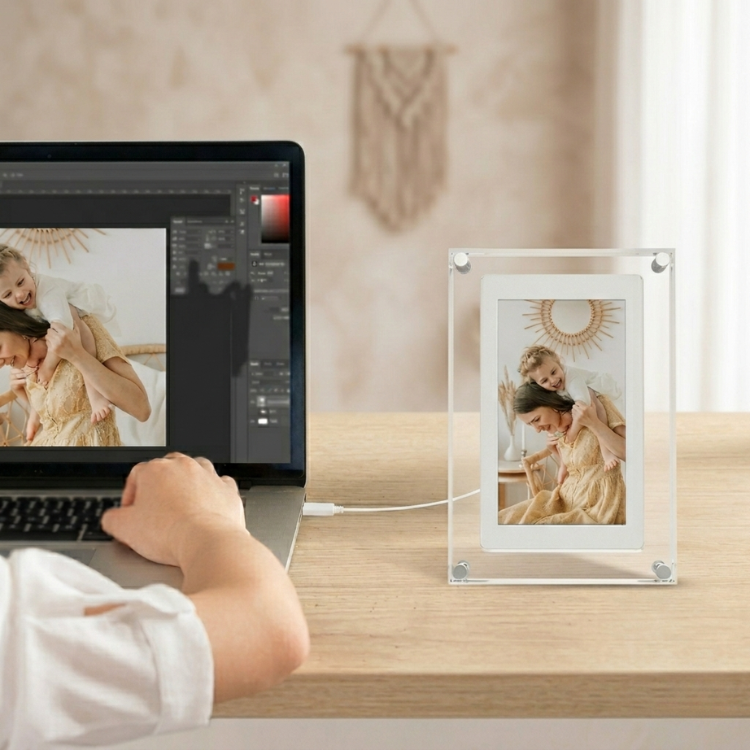
- Plug in the included USB cable
- Connect the frame to your computer
- It will appear like a standard USB drive
Step 2: Add Your Special Video
- Open the frame folder
- Drag and drop your ultrasound or heartbeat video
- Wait for the file to finish transferring
Step 3: Power On & Relive the Moment
- Safely eject the device
- Plug the frame into power
- Turn it on and your video will automatically play and loop

First Heartbeat Forever
Relive your baby’s very first heartbeat anytime you want

Easy Plug and Play
Transfer your ultrasound video in seconds and let it play instantly

A Gift Full of Love
A meaningful keepsake that celebrates the journey into motherhood
Relive the First Heartbeat
Real Video, Real Emotion
A Memory That Lasts Forever
Relive the First Heartbeat
Real Video, Real Emotion
A Memory That Lasts Forever
Relive the First Heartbeat
Real Video, Real Emotion
A Memory That Lasts Forever
Relive the First Heartbeat
Real Video, Real Emotion
A Memory That Lasts Forever
Relive the First Heartbeat
Real Video, Real Emotion
A Memory That Lasts Forever
Relive the First Heartbeat
Real Video, Real Emotion
A Memory That Lasts Forever
Relive the First Heartbeat
Real Video, Real Emotion
A Memory That Lasts Forever
Relive the First Heartbeat
Real Video, Real Emotion
A Memory That Lasts Forever
Relive the First Heartbeat
Real Video, Real Emotion
A Memory That Lasts Forever
Relive the First Heartbeat
Real Video, Real Emotion
A Memory That Lasts Forever
Relive the First Heartbeat
Real Video, Real Emotion
A Memory That Lasts Forever
Relive the First Heartbeat
Real Video, Real Emotion
A Memory That Lasts Forever
Why Choose Our Digital Memory Frame
See how we compare to ordinary digital frames
| Miniverse | Others | |
|---|---|---|
| Real Ultrasound Video Playback | ||
| Plug and Play Setup | ||
| No WiFi Required | ||
| Meaningful Keepsake Design | ||
| Easy Video Updates |
It’s Going Viral for a Reason
-

I Cried the First Time I Played It
I uploaded our ultrasound video and seeing the heartbeat play on my nightstand felt unreal. It is such a special way to relive that moment every day.
-

The Most Meaningful Gift I Have Received
My husband surprised me with this after our appointment. I did not expect it to actually play the real video. It is simple to use and so emotional. I watch it all the time.
-

So Simple Yet So Powerful
I thought it would be complicated but it was just plug and transfer. No apps, no WiFi. Now our baby’s first heartbeat is always playing on my desk.


Relive the First Heartbeat
Real Video, Real Emotion
A Memory That Lasts Forever
Relive the First Heartbeat
Real Video, Real Emotion
A Memory That Lasts Forever
Relive the First Heartbeat
Real Video, Real Emotion
A Memory That Lasts Forever
Relive the First Heartbeat
Real Video, Real Emotion
A Memory That Lasts Forever
Relive the First Heartbeat
Real Video, Real Emotion
A Memory That Lasts Forever
Relive the First Heartbeat
Real Video, Real Emotion
A Memory That Lasts Forever
Relive the First Heartbeat
Real Video, Real Emotion
A Memory That Lasts Forever
Relive the First Heartbeat
Real Video, Real Emotion
A Memory That Lasts Forever
Relive the First Heartbeat
Real Video, Real Emotion
A Memory That Lasts Forever
Relive the First Heartbeat
Real Video, Real Emotion
A Memory That Lasts Forever
Relive the First Heartbeat
Real Video, Real Emotion
A Memory That Lasts Forever
Relive the First Heartbeat
Real Video, Real Emotion
A Memory That Lasts Forever
From curious to confident
How do I upload or change media?
How do I upload or change media?
Simply connect the frame to your computer using the included cable and drag and drop your videos or photos into the built-in storage. You can update or replace content anytime.
Does it play sound and is it rechargeable?
Does it play sound and is it rechargeable?
Yes, the frame plays video with sound and features a rechargeable battery that can be powered up with the included cable.
How much storage does it have?
How much storage does it have?
It comes with 8GB of internal storage, allowing you to store multiple videos and photos with ease.
Can it be displayed in different orientations?
Can it be displayed in different orientations?
Yes, the frame can be rotated to display content in both portrait and landscape mode.
Still have questions?
Still have questions?
Feel free to reach out to us at Miniverse.work@gmail.com.
we’re always happy to help.